
Watch every session from one terminal
agx dash tracks running, waiting, successful, failed, and killed agents side by side. Open any session to read its log, or press d for a live unified diff of its worktree that refreshes while the agent works.
agxagent cross
agx starts Claude Code, Codex CLI, Gemini CLI, and OpenCode in isolated worktrees, then gives you a single terminal dashboard to monitor, resume, inspect, and clean up every session.
brew tap jedipunkz/agx && brew install agx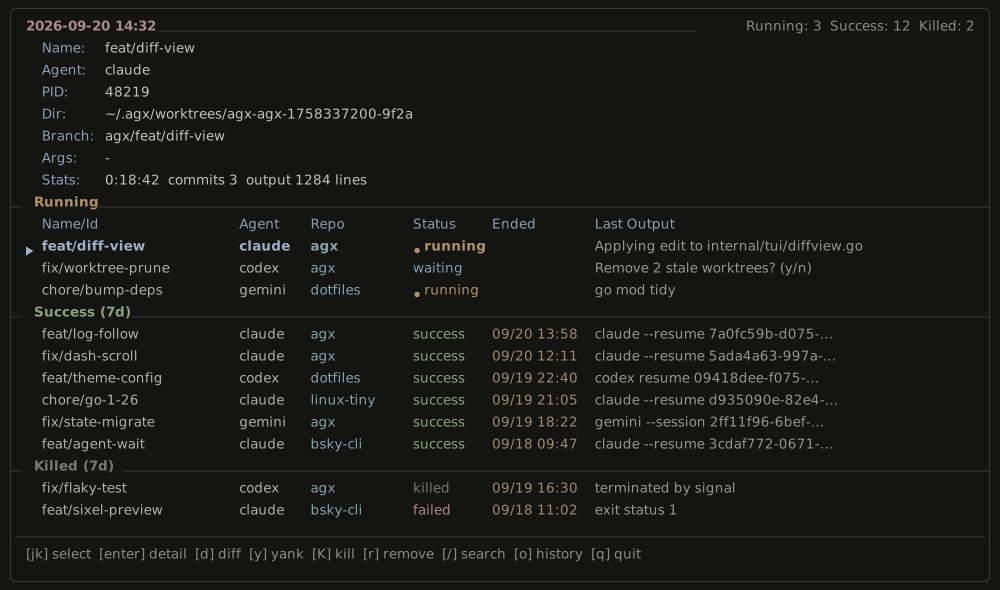
Features
Each session is isolated by git, observable from one place, and cleaned up on its own.
agx dash tracks running, waiting, successful, failed, and killed agents side by side. Open any session to read its log, or press d for a live unified diff of its worktree that refreshes while the agent works.
Start Claude Code, Codex CLI, Gemini CLI, or OpenCode with the same command and pass runner-specific flags after --.
Every session gets its own git worktree and agx/<id> branch, so parallel agents never touch each other or your main checkout.
Reattach to a session by name or ID, drop into its worktree with a single command, or stop an agent that has gone astray.
agx agent wait blocks until a session exits or pauses and forwards its exit code, so pipelines can chain on it and answer prompts with agx agent input.
Follow live output with logs -f while the daemon streams it, or dump the full log with ANSI escapes stripped.
Finished sessions age out of the dashboard, and while agx dash is running it removes their worktrees in the background on the schedule you set in ~/.agx/agx.yaml.
Workflow
The whole loop runs from the shell you are already in — no daemon to babysit, no per-agent terminal to keep open.
cd /path/to/repo && agx agent newagx detects the current git repository and branches an isolated worktree for the new agent.
agx agent new -a codex -n feat/fooClaude Code is the default. Use -a to choose another runner and -n to name the session and its branch.
agx dashMonitor status, search sessions, copy worktree paths, read logs, and watch a live diff of what each agent changed.
agx agent logs -f -n feat/fooStream a session from any terminal. Drop -f to dump the whole log with ANSI escapes stripped.
agx agent wait -n feat/foo && ./deploy.shwait exits when the session ends or pauses, so scripts can chain on it. Answer a paused agent with agx agent input.
agx agent resume -n feat/fooReattach to earlier work, or run agx agent rm to drop a finished worktree, log, and state entry.
Session state, logs, and worktrees live under ~/.agx/. Dashboard theme, finished-session retention, and automatic worktree cleanup are configured in ~/.agx/agx.yaml.
Reference
Nine commands and eight keys. Everything else is git.
agx agent newagx agent resumeagx agent listagx agent logsagx agent cdagx agent waitagx agent inputagx agent rmagx dashInstall
Homebrew on macOS and Linux. agx is MIT licensed and builds from source with Go.
brew tap jedipunkz/agx && brew install agxPrefer a binary? Grab one from Releases, or read the documentation.